
 ChatGPT
 Claude
Introduction: Why Modern Systems need Kafka
In today’s world, all companies require large scale data sets for testing, developing products, and market analysis. As data volume increases, traditional systems often struggle to scale effectively. This leads to:
- Reduced throughput
- Performance bottlenecks
- Increased system complexity
Furthermore, connecting several systems with each other in traditional ways can be cumbersome and highly dependent.
To address these challenges, Apache Kafka was introduced by LinkedIn in 2011 as a distributed, high-performance messaging and streaming platform. Later, it became open source under the Apache Software Foundation.
Sounds interesting?
In this blog post, you will learn about:
- What Kafka is and how it works
- Why it is so fast
- Real-world use cases
- A practical Kafka + .NET implementation
What is Apache Kafka?
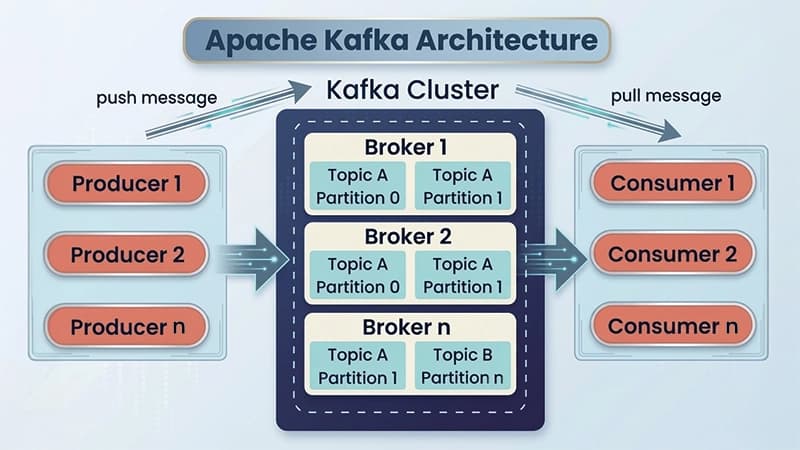
Apache Kafka is a technology that helps applications to send, store, and process data continuously in real time. It is well designed to handle large amounts of data while staying fast, scalable, and reliable.
It operates on publish-subscribe model:
- Producers publish data to topics
- Consumers subscribe and consume that data
Kafka is widely used in:
- Logging
- Streaming data
- Real-time analytics
To ensure durability, Kafka replicates data across multiple brokers, making it highly resilient.
What Makes Kafka So Fast?
Kafka’s exceptional performance is driven by a combination of smart design principles:
1. Sequential I/O
Kafka uses a log-based storage mechanism, writing data sequentially to disk
Benefits:
- Faster disk operations
- Reduced latency
- Near RAM-level performance
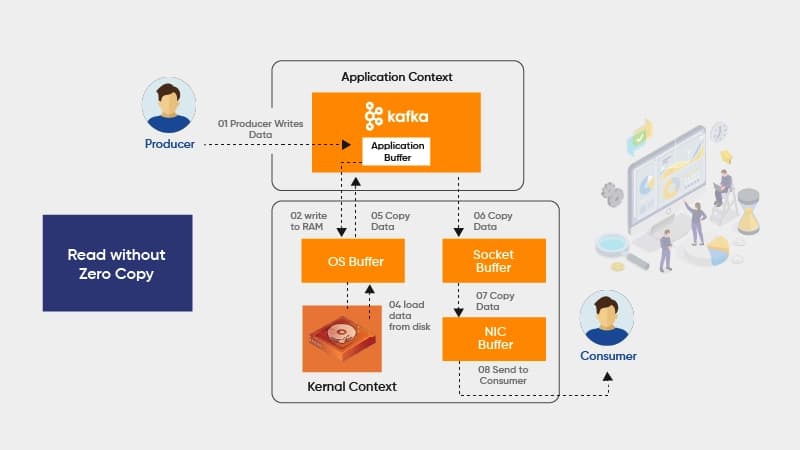
2. Zero Copy Principle
Kafka minimizes data copying between application and kernel space.
Benefits:
- Faster data transfer
- Lower CPU overhead
3. Message Compression & Batching
Kafka compresses and batches messages before sending.
Benefits:
- Reduced network usage
- Higher throughput
Why Kafka is Fast?
Why Choose Kafka?
Apache Kafka is widely adopted due to the following advantages:
1. High PerformanceHandles millions of messages per second efficiently
2. Durability (Non-volatile Storage)Messages get stored in a persistent way and can be accessed at any time.
3. Distributed ArchitectureEasily scales horizontally by adding brokers
4. Decoupled CommunicationProducers and consumers are independent
5. Fault ToleranceData is replicated across multiple nodes
6. ScalabilityProcessing more messages while maintaining performance
Handles millions of messages per second efficiently
Messages get stored in a persistent way and can be accessed at any time.
Easily scales horizontally by adding brokers
Producers and consumers are independent
Data is replicated across multiple nodes
Processing more messages while maintaining performance
Use Cases of Apache Kafka
1. Data Streaming
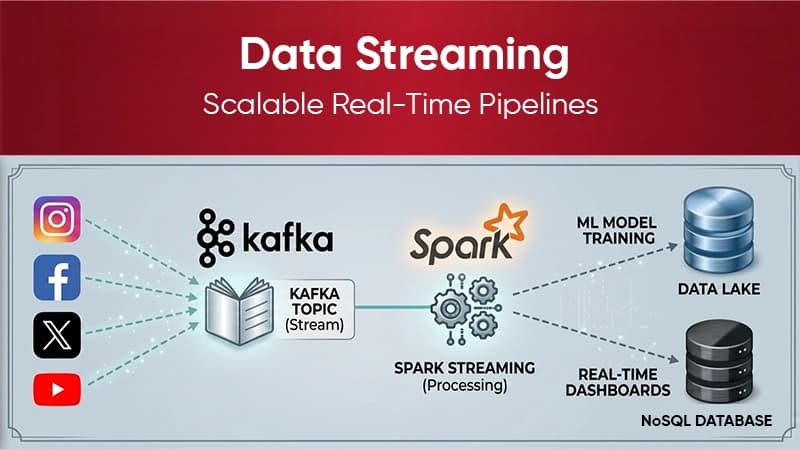
Kafka enables real-time data processing using tools like:
– Kafka Streams
– Apache Spark
– Apache Flink
2. Log Aggregation
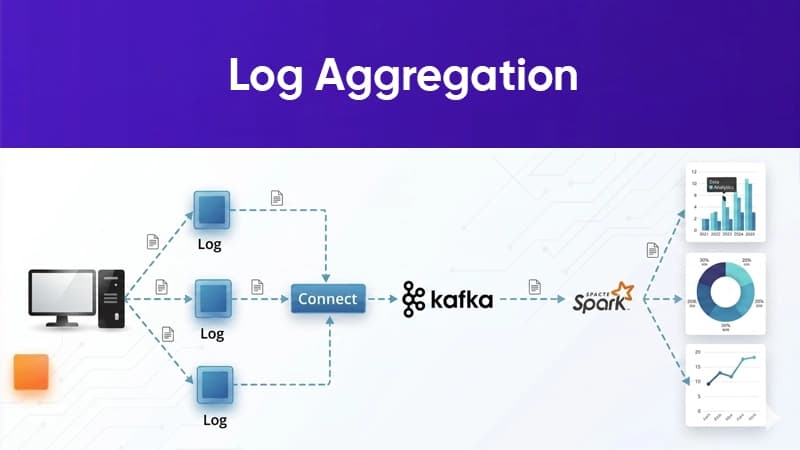
Centralizes logs from multiple systems for easier monitoring and debugging.
3. Data Replication
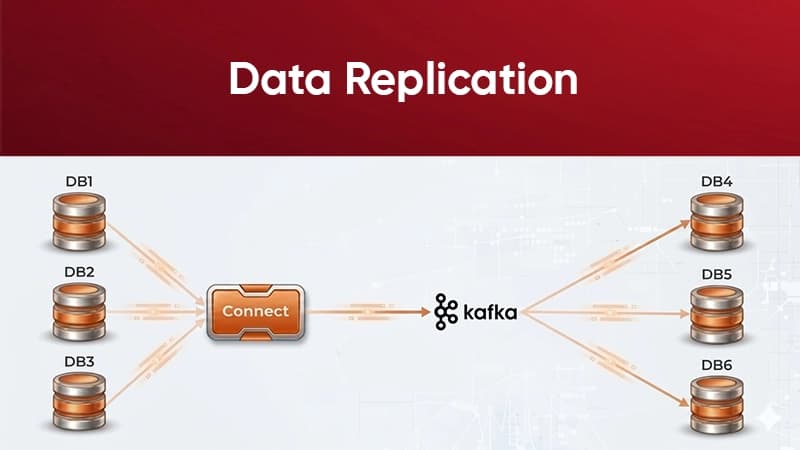
Keeps data consistent and available in multiple systems or data centers
4. Messaging Queue
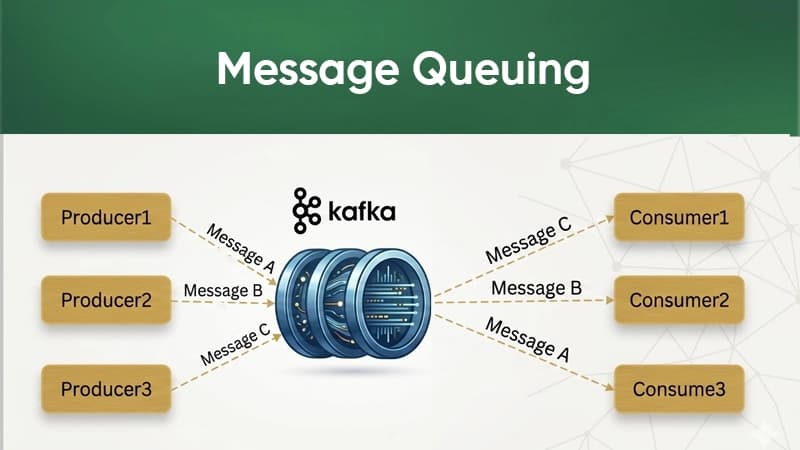
Acts as a high-performance messaging system for microservices communication.
5. Web Activity Tracking
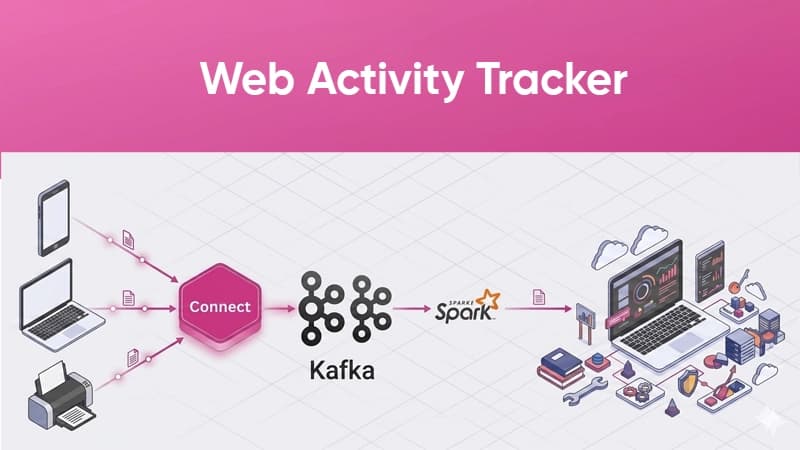
Tracks user behaviour such as clicks, page visits, and interactions in real time.
Hands on kafka + .NET Implementation
Let us get started with understanding Kafka with practical example. For that purpose. I have created two applications here:
– Producer (Sender)
– Consumer (Receiver)
👉 The Producer sends messages to Kafka, and the Consumer reads them.
Step 1: Install Kafka
Kafka can be run on either of below ways:
– Local setup OR
– Docker (recommended for easy setup)
Step 2: Add Required Package
In your .NET project, install:
dotnet add package Confluent.Kafka
Step 3: Producer (Send Message)
👉 What this does:
– Connects to Kafka
– Sends message to orders topic
Step 4: Consumer (Read Message)
👉 What this does:
– Subscribes to orders topic
– Continuously reads message
Use Kafka when:
You need high performanceKafka can process millions of messages per second without affecting its perfomance
Your system needs to scale easilyYou can add more brokers instead of redesigning the system
You want fault-tolerant systemsData is replicated, so no data loss even if a server fails
You are building microservicesKafka helps decouple services (no direct dependency)
You need data replay capabilityYou can reprocess old messages anytime
You require real-time processingUseful for dashboards, notifications, and live tracking
Kafka can process millions of messages per second without affecting its perfomance
You can add more brokers instead of redesigning the system
Data is replicated, so no data loss even if a server fails
Kafka helps decouple services (no direct dependency)
You can reprocess old messages anytime
Useful for dashboards, notifications, and live tracking
Avoid Kafka when
Your project is small or simpleKafka might be too complicated for basic use cases
You want easy setup and fast developmentKafka setup requires some knowledge of brokers, topics, partitions
You need strict message ordering everywhereKafka guarantees order of messages only within a topic partition
You cannot handle duplicate messagesKafka may deliver messages more than once or at-least-once delivery.
You need built-in filtering of messagesMessage filtering should be done manually with Kafka.
Your team is new to Kafka conceptsIt takes time to learn concepts like offsets, partitions, and consumer groups.
Kafka might be too complicated for basic use cases
Kafka setup requires some knowledge of brokers, topics, partitions
Kafka guarantees order of messages only within a topic partition
Kafka may deliver messages more than once or at-least-once delivery.
Message filtering should be done manually with Kafka.It takes time to learn concepts like offsets, partitions, and consumer groups.