
Archive for month

May, 2026

ORACLE LDAP (OID) Authentication Using Java

oracle

Overview

LDAP Oracle requires OID for connections with LDAP and Java; hence, certain criteria need to be satisfied. LDAP (Lightweight Directory Access Protocol) refers to the protocols employed in accessing and managing directories via the network. The Oracle Internet Directory (OID) is an LDAP server from Oracle, which utilizes Oracle Database. It plays a crucial role within the Oracle Identity Management suite of products. In the event that Oracle Database is accessed with LDAP, OID acts as a directory mapping service name to database descriptor.

Need LDAP SERVER or ORACLE LDAP SERVER

As per the industrial standards, LDAP Servers, such as the Oracle LDAP (OID) might be pre-installed in order to handle identity management. If it is a new deployment, one will require either an OpenLDAP Server with Oracle OID schema files or Oracle Internet Directory. The configuration of the below example is performed with an OpenLDAP Server that was augmented using Oracle OID Schema LDIF files. Below is the error message that would be displayed if the connection is attempted without configuring anything.

Caused by: oracle.net.ns.NetException: JNDI Package failure javax.naming.NameNotFoundException: [LDAP: error code 32 – No Such Object]; remaining name ‘cn=oracle-context,dc=test,dc=com’

Root cause

In this scenario, it’s attempting to find the existing object within the directory hierarchy, but it cannot find it, hence it’s better to verify the actual name of the object. If there are any typos in the entry, please correct it accordingly to provide the correct object name. As per the LDAP protocol, error code 32 represents “No such object,” which states that the DN being searched for is not found in the directory because it does not exist. In this scenario, the Oracle JDBC driver is attempting to search for cn=oracle-context from the base DN; however, it doesn’t exist because the schema of the Oracle OID is not loaded in the LDAP server.

While troubleshooting this problem, it was observed that orclNetDescString is blank. Due to this, there is no possible way in which connection between Oracle and LDAP can be established. An OID schema is required. OrclNetDescString is an attribute provided by Oracle that has TNS connect string for the database service. OrclNetDescString attribute is absent since there is no OID schema present at the LDAP server side. It should be noted that OID schema is necessary since LDAP must know about proprietary Oracle objects/attributes.

Solution

Ensure that you download the LDIF files as described below; LDIF files help link the Oracle LDAP authentication process. This is a simple plain text format representing directory entry objects. In Oracle, there are three specific files which contain definition of the object class including attributes for LDAP authentication. These files help ensure that Oracle specific attribute values such as “orclNetDescString,” “orclNetService” and “oracle-context” get inserted into your LDAP server schema. This is important in creating a JDBC database connection using LDAP.

1. Create a folder and copy those LDIF files to that location

2. Add the above files to the LDAP server

3. Create the /etc/openldap/testdb.ldif file and paste the below lines

				
					dn: cn=testdb,dc=itfits,dc=biz 

objectclass: top 

objectclass: orclNetService 

cn: testdb 

orclNetDescString: (DESCRIPTION=(ADDRESS=(PROTOCOL=TCP)(HOST=hostname)(PORT=1521))(CONNECT_DATA=(SERVICE_NAME=testdb))) 


4. Build the structure of the directory service

Oracle server

1. Oracle server-side changes are required. Follow the steps below

The LDAP Server is now up and running to serve our Oracle. However, the Oracle might not be configured to access an LDAP server; hence, some effort should be put into configuring it. This is an essential procedure, which most people tend to ignore. Even if the LDAP server has been perfectly set up, the Oracle database client (or the JDBC Thin driver) will need to be informed on how to locate the LDAP server and make use of it for name resolution. This is done through a specially created configuration file named ldap.ora. Consider this file similar to the DNS resolver config file used by other clients like Apache Tomcat; it informs Oracle’s networking layer on which LDAP server it has to contact in order to resolve a service name and what the default naming context (base DN) should be. The “$ORACLE_HOME/network/admin/ldap.ora” file should be created, with the following configuration:

Note: If you don’t have the ldap.ora file, then create a new ldap.ora file under this $ORACLE_HOME/network/admin/ldap.ora

# ldap.ora

# Place this file in the network/admin subdirectory or your

# $ORACLE_HOME location.

DIRECTORY_SERVERS = (:389:636)

DEFAULT_ADMIN_CONTEXT = “dc=test,dc=com”

DIRECTORY_SERVER_TYPE = OID

Once completed with all steps, just restart the Oracle server and LDAP server, just for safety purposes.

Lastly, configure the LDAP JDBC URL to point to Oracle. The time to shine for your work arrives here. In place of the standard JDBC URL where you explicitly specify a hostname and port number for your database, you create an LDAP-style URL, which instructs the Oracle JDBC Thin driver to find the database service using information stored in the LDAP store. With this step, your application becomes independent of the actual database server address and port – all changes can be made within the LDAP server without requiring reconfiguration of your application deployment.

jdbc:oracle:thin:@ldap://:389/cn=testdb,dc=test,dc=com

2. Use any third-party tool to connect to the Oracle LDAP connection. Here we are using Oracle SQL Server
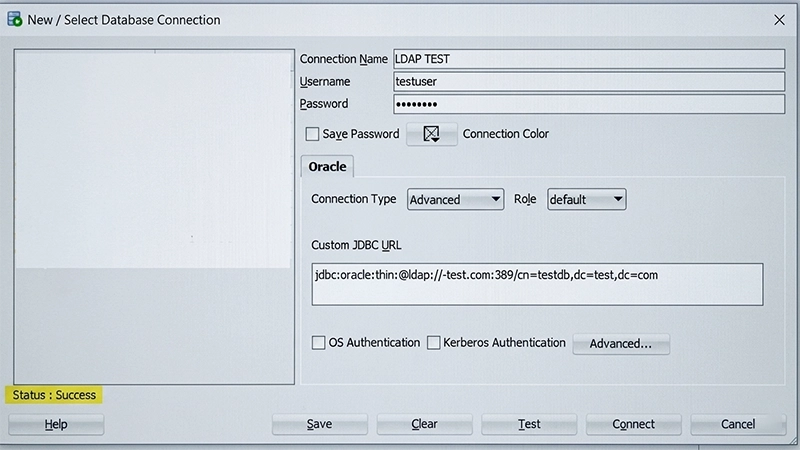
Example code to demonstrate Oracle LDAP authentication to validate the connection. Below is a small yet complete Java program that shows how to create an Oracle JDBC connection via LDAP name resolution. This sample program makes use of the DriverManager APIs along with a JDBC URL following the LDAP format. It loads the Oracle JDBC driver explicitly and then confirms the connection through a query on the Oracle dual table, which is one of the ways Oracle tests its connections.
package testdb.oracle.jdbc;

				
					import java.sql.Connection; 
import java.sql.DriverManager;
import java.sql.ResultSet; 
import java.sql.SQLException; 
import java.util.Properties; 

public class LDAPConn { 

    public static void main(String[] args) throws SQLException { 

        String url = "jdbc:oracle:thin:@ldap://<ip or hostname>:389/cn=testdb,dc=test,dc=com"; 

        Properties props = new Properties(); 

        props.setProperty("user", "testuser"); 

        props.setProperty("password", "ldappassword"); 

        DriverManager.registerDriver(new oracle.jdbc.OracleDriver()); 

        Connection conn = DriverManager.getConnection(url, props); 

        if(!conn.isClosed()){ 

            System.out.println("<<<< LDAP auth connected successfully >>>>"); 

        } 

        ResultSet res = conn. 

                prepareCall(“SELECT 'Hello LDAP World” as txt from dual"). 

                executeQuery(); 

        res.next(); 

        System.out.println(res.getString("txt")); 

    } 

} 


Conclusion

In this specific blog, it is all about making a connection with LDAP and setting up the Oracle service part of it together with the LDAP. Apart from this, also did the initial checks of the directory to get the best output as far as the connection is concerned. Configuration of Oracle LDAP (OID) for authentication is not an easy task to do since you need to understand the relationship between three things: Oracle LDAP Schema, Oracle LDAP Directory entries, and Oracle clients ldap.ora. When these three aspects are sorted out, a connection is made easy. What generally goes wrong while doing the configuration is the lack of OID schema LDIF files which leaves the LDAP server clueless as to how an Oracle Object class looks like. If done right, one can have a perfect connection with the appropriate jdbc connection string.

Looking to streamline Oracle connectivity and identity management across enterprise systems?

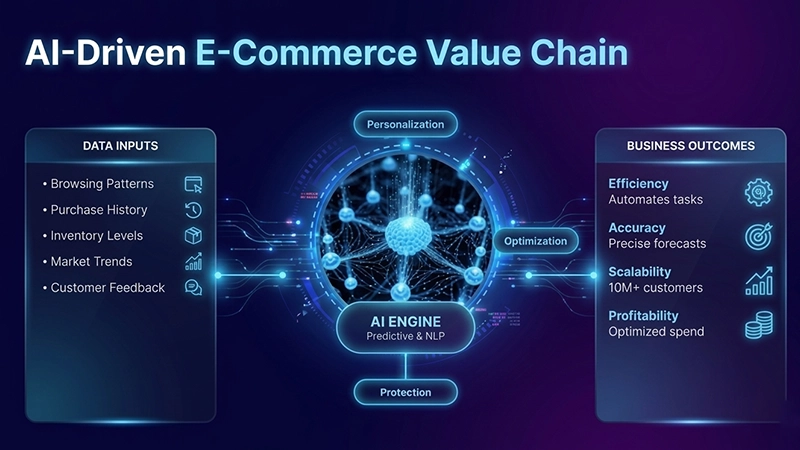
AI in E-commerce business analysis | Revolutionizing the Digital marketspace

AI in Ecommerce

Why AI in E-Commerce Matters

Exponential Growth

The global e-commerce market is valued at $7.4 trillion in 2025, entirely driven by mobile commerce, international transactions, and the fast adoption of digital payments across developing markets. This growth increases an evolutionary change in consumer behaviour, specifically in product discovery, evaluation, and acquisition changes that are taking place more rapidly than ever before.

Business Challenges

With growing competition online, Companies have to cater to millions of customers with personalized offerings, keep their supply chains streamlined, and create loyal customers at no switch cost. Even well-funded retailers struggle to meet these demands consistently without the right tools.

AI Transformation

It converts raw data into actionable insights to help in decision making. By analysing huge transactional, behavioral, and market datasets in real time, Now AI e-commerce leaders can respond proactively rather than reactively which helps in precision at every stage of the customer journey.

Market Growth

$6.9 Trillion

Global e-commerce sales are expected to reach this milestone by 2026, marking an exponential growth path for digital marketplaces. This figure highlights the massive business potential and at the same time massive challenge for organizations to implement smart and scalable solutions to compete others.

Strategic Challenges

Companies face challenges in achieving personalization on a large scale, managing inventory in a complex way, and maintaining a customer base over time. Providing customized solutions for a mass audience, optimizing stock levels, and establishing an emotional connection between a company and consumers in today’s competitive environment are problems that existing analytical solutions are unable to solve effectively enough.

Core Benefit

Actionable Insights

It benefits in transforming complexity into simplicity through smarter decision-making. AI transforms huge amount of signal such as clickstreams, purchase histories, social media sentiment, and supply chain data into focused insights that helps e-commerce teams act with confidence and speed.

What is AI in Business Analysis?

AI can be defined as the application of machine learning systems, algorithms for analyzing big data sets, and automation techniques to improve decision-making. In an e-commerce environment, all these aspects interact to process different kinds of data, including user behavior and logistics information, and make informed decisions.

Predictive Analytics

It is using historical data to forecast future trends, sales volumes, and market shifts with high precision. For example, a business organization may be able to predict an increase in demand during certain seasons of the year, thereby making sure that they have enough stock without investing unnecessarily.

NLP for Interactions

The Natural Language Processing technique is utilized in developing intelligent chatbots and sentiment analysis applications. An NLP-powered chatbot can handle numerous customer support requests at once, solve their problems immediately, and even recognize when customers are angry and intervene before the problem turns into something bigger.

Automated Inventory

Using smart systems to manage stock levels, prevent stockouts, and reduce waste through automation. It continuously monitors sales velocity, supplier lead times, and seasonal patterns to automatically reorder products at the right time and in the right quantities. It saves operating teams time consumption in manual tracking and improving fulfilment saves rate.

Core Applications of AI in E-Commerce

Personalized Recommendations

Dynamic Pricing Optimization

Inventory Management

Customer Sentiment Analysis

The Future of AI in E-Commerce

Sustainable AI Ecosystems

AI-driven sustainability in the supply chain minimizes waste and carbon emissions by using hyper-efficient route planning and demand prediction. By determining the precise amount of inventory required and the most efficient routes for final delivery, e-commerce companies can minimize their environmental impact and save costs—showing that profit and sustainability go hand in hand.

Immersive Meta-Commerce

By integrating AR, VR, and AI together, organizations will be able to completely rethink the manner in which they design, demonstrate, and sell their products through digital platforms. Rather than using conventional catalogs, companies will be able to create immersive visualizations of the products, virtual showrooms, and AI-powered configurations that help customers better understand the products and services on offer.

Meta-commerce will allow enterprises to shorten their sales cycle and provide better experiences for buyers and differentiate themselves from others.

Turn CX insights into impact. Know more about how we have helped spin AI Agents for Retail Customers

Building High Performance Real Time Data Pipelines with .NET – Apache Kafka

Apache kafha

Introduction: Why Modern Systems need Kafka

In today’s world, all companies require large scale data sets for testing, developing products, and market analysis. As data volume increases, traditional systems often struggle to scale effectively. This leads to:

Furthermore, connecting several systems with each other in traditional ways can be cumbersome and highly dependent.

To address these challenges, Apache Kafka was introduced by LinkedIn in 2011 as a distributed, high-performance messaging and streaming platform. Later, it became open source under the Apache Software Foundation.

Sounds interesting?

In this blog post, you will learn about:

What is Apache Kafka?

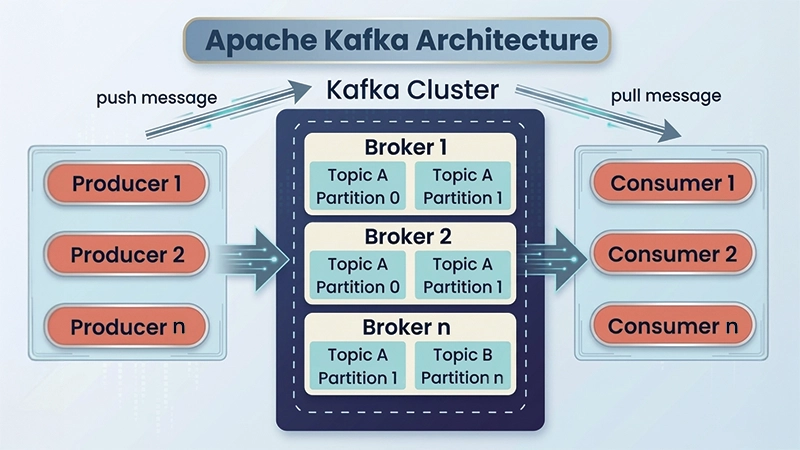
Apache Kafka is a technology that helps applications to send, store, and process data continuously in real time. It is well designed to handle large amounts of data while staying fast, scalable, and reliable.

It operates on publish-subscribe model:

Kafka is widely used in:

To ensure durability, Kafka replicates data across multiple brokers, making it highly resilient.

What Makes Kafka So Fast?

Kafka’s exceptional performance is driven by a combination of smart design principles:

1. Sequential I/O

Kafka uses a log-based storage mechanism, writing data sequentially to disk

Benefits:

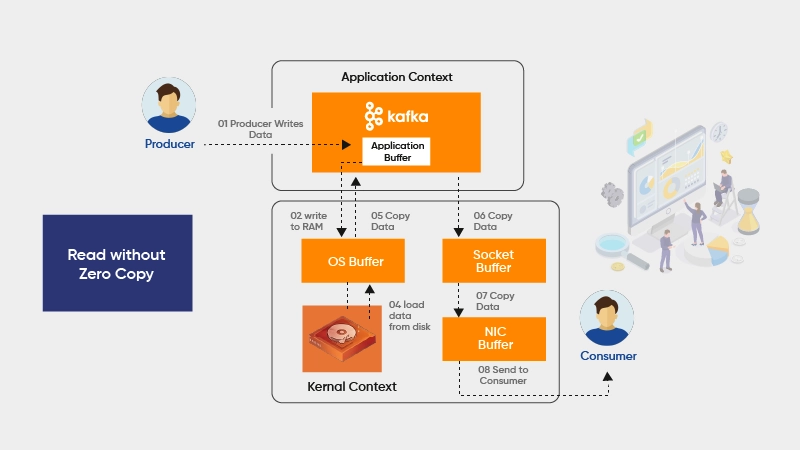
2. Zero Copy Principle

Kafka minimizes data copying between application and kernel space.

Benefits:

3. Message Compression & Batching

Kafka compresses and batches messages before sending.

Benefits:

Why Kafka is Fast?

Why Choose Kafka?

Apache Kafka is widely adopted due to the following advantages:

1. High Performance
Handles millions of messages per second efficiently

Messages get stored in a persistent way and can be accessed at any time.

Easily scales horizontally by adding brokers

Producers and consumers are independent

Data is replicated across multiple nodes

Processing more messages while maintaining performance

Use Cases of Apache Kafka

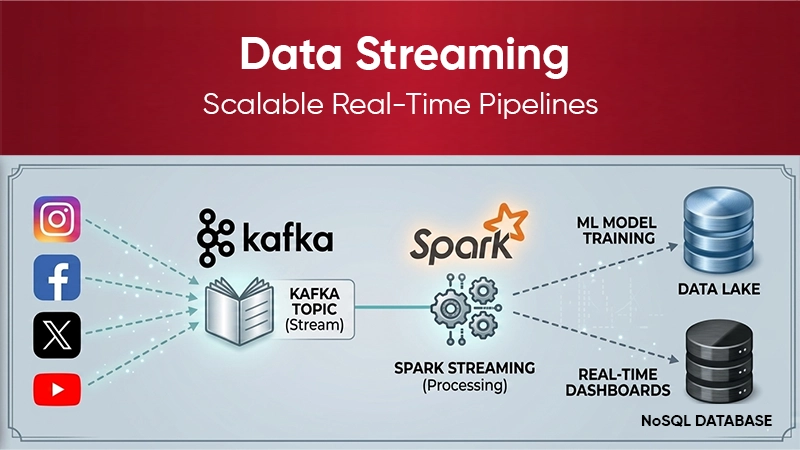
1. Data Streaming

Kafka enables real-time data processing using tools like:

– Kafka Streams

– Apache Spark

– Apache Flink

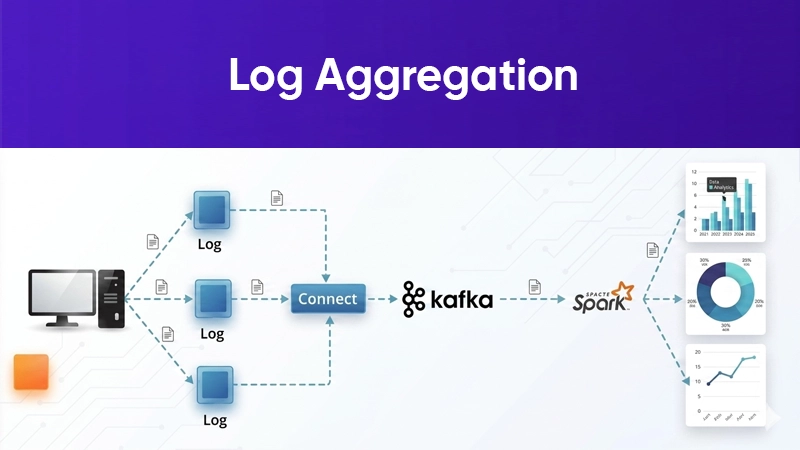
2. Log Aggregation

Centralizes logs from multiple systems for easier monitoring and debugging.

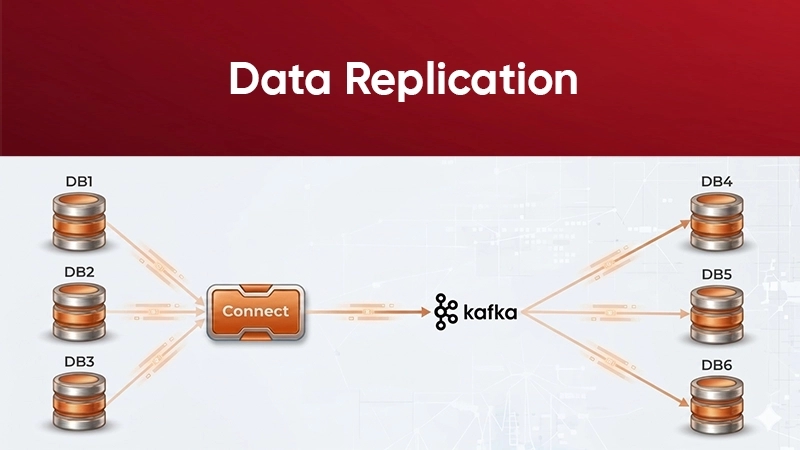
3. Data Replication

Keeps data consistent and available in multiple systems or data centers

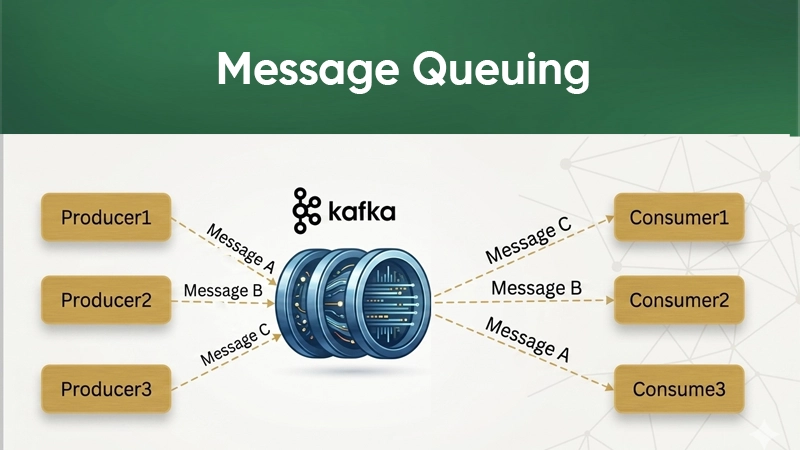
4. Messaging Queue

Acts as a high-performance messaging system for microservices communication.

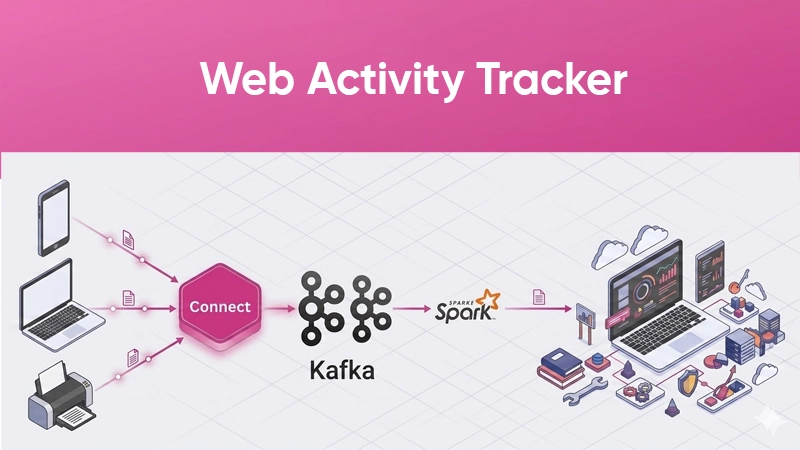
5. Web Activity Tracking

Tracks user behaviour such as clicks, page visits, and interactions in real time.

Hands on kafka + .NET Implementation

Let us get started with understanding Kafka with practical example. For that purpose. I have created two applications here:

– Producer (Sender)

– Consumer (Receiver)

👉 The Producer sends messages to Kafka, and the Consumer reads them.

Step 1: Install Kafka

Kafka can be run on either of below ways:

– Local setup OR

– Docker (recommended for easy setup)

Step 2: Add Required Package

In your .NET project, install:

dotnet add package Confluent.Kafka

Step 3: Producer (Send Message)

				
					var config = new ProducerConfig 
{ 

BootstrapServers = "localhost:9092" 
 }; 
using var producer = new ProducerBuilder<Null, string>(config).Build(); 
await producer.ProduceAsync("orders", new Message<Null, string> 
{ 
Value = "Order Created" 
}); 
Console.WriteLine("Message sent successfully!"); 


👉 What this does:

– Connects to Kafka

– Sends message to orders topic

Step 4: Consumer (Read Message)

				
					using Confluent.Kafka;
	var config = new ConsumerConfig
	{
		BootstrapServers = "localhost:9092", GroupId = "order-group", 

		AutoOffsetReset = AutoOffsetReset.Earliest 

	};
	using var consumer = new ConsumerBuilder<Ignore, string>(config).Build(); consumer.Subscribe("orders");
	while (true)
	{ 
		var result = consumer.Consume(); Console.WriteLine($"Received: {result.Message.Value}"); 

	} 


👉 What this does:

– Subscribes to orders topic

– Continuously reads message

Use Kafka when:

You need high performance

Kafka can process millions of messages per second without affecting its perfomance

You can add more brokers instead of redesigning the system

Data is replicated, so no data loss even if a server fails

Kafka helps decouple services (no direct dependency)

You can reprocess old messages anytime

Useful for dashboards, notifications, and live tracking

Avoid Kafka when

Your project is small or simple

Kafka might be too complicated for basic use cases

Kafka setup requires some knowledge of brokers, topics, partitions

Kafka guarantees order of messages only within a topic partition

Kafka may deliver messages more than once or at-least-once delivery.

Message filtering should be done manually with Kafka.
It takes time to learn concepts like offsets, partitions, and consumer groups.

Build the intelligence foundation your business needs for growth

Nexus logo

Get Started with NexUs Today!

NexAssure logo

Get Started with NexAssure Today!

NexDox logo

Get Started with NexDox Today!

NexOps logo

Get Started with NexOps Today!

NexAA logo

Get Started with NexAA Today!

logo

Let's talk about your next big project.

Looking for a new career?